Follow the instructions below to automatically allow camera access when adding students to a session in Chrome on your Android Device.
- Visit the Dojo Manager site and tap the Add Student to Session button
- Tap While using the app
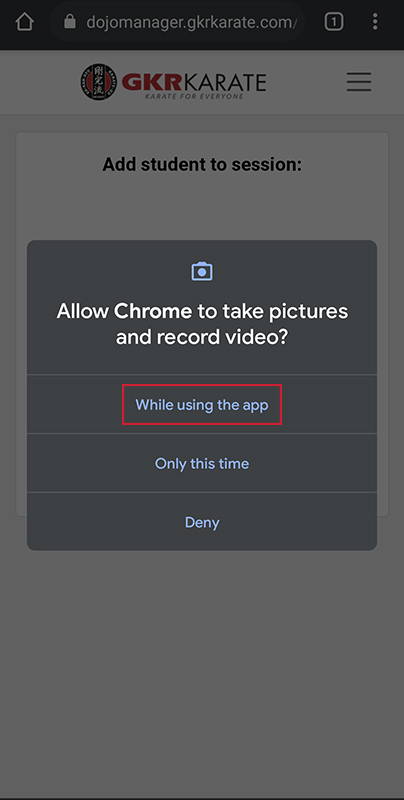


Follow the instructions below to automatically allow camera access when adding students to a session in Chrome on your Android Device.
GKR creates the right environment for our members to train in. Although we promote self defence and fitness, our style also fosters positive values, confidence, discipline, focus and well being. GKR teaches you not only how to punch and kick, it teaches you to be a better person.
We encourage students of all ages, from all walks of life to join our club and be part of the supportive ‘family’ that is GKR Karate.
Contact Us
Have a question or require further information? Contact us today.
GKR Karate brings the exciting Martial Art of Karate to everyone. We are passionate about sharing our skills and knowledge, and we aim to inspire and empower people to reach their maximum potential through the consistent practice of Karate. We are a family club that is dedicated to fostering sound values and developing strong, humble, brave individuals and healthy communities.
If you’re interested in finding out more about joining GKR Karate, submit your details below and we will be in touch!